Room 3 at Wesley Primary School have been using a variety of Google tools to share their maths strategies. You will see that it has all been put together using a Google Drawing. If you click on the link on their class blog you will be able to access each group of students Google Drawing. From here you can check out all their strategies for round and compensating. They have used Screencastify to create their movies and Google Docs for their reflections. This is a great template put together by +Phil Margetts that could be used by other teachers to encourage their learners to share their math learning in multi modal/rewindable ways.

Showing posts with label Rewindable Learning. Show all posts
Showing posts with label Rewindable Learning. Show all posts

Place Value to the Millions
Martin is in the Year 5/6 Mamaku learning environment at Grey Main School, Toki Pounmau cluster. Martin has used Google Slides to present his understanding of place value to the millions in a creative way. Head on over to their class blog and meet 'Peashooter' the math tutor who will teach you all about place value. A great example of a rewindable learning DLO created by a student. Remember to leave a comment for Martin.

We will, we will ROUND you - Learning Math through Song
The year 5 and 6 students in Room 5 at Tautoro School have been using their place value knowledge to understand how to round to tidy numbers. They have learnt to round to the nearest ten, hundred, thousand, whole and tenth. To share their learning of these mathematical concepts they have used the power of song and dance and had fun being creative! You can check out their two video clips on their class blog. You can also head over to Kohl-lee's individual blog to check out her Rounding DLO. Great blogposts to show teachers and learners ways of learning and sharing math in creative ways.

Credit - +Lana Giesbers , Kohl-lee and the Room 5 groovers!
Credit - +Lana Giesbers , Kohl-lee and the Room 5 groovers!
Creating Paper Planes
The Year 1 and 2 students at Ohaeawai School have been learning all sorts about air pressure. They have built paper planes to experiment with what happens to it using pressure from different air forces. They have used YouTube video tutorials to follow instructions on how to create a paper plane. A small group of learners have put together their own video explaining how to make a basic paper plane. A great example of rewindable learning. Check out their video on their class blog. You will read that they have also written step by step instructions as well, meeting the differing needs of different people - some who prefer to follow written instructions, some who prefer a video tutorial.

Credit -+Sarah Jane Stevenson

Credit -
Tirama Tirama Matariki
Year 1 and 2 students at Ohaeawai School have been learning a new song to help them remember the stars of Matariki, Tirama, Tirama Matariki. They have put together a video clip to help them learn the actions of the songs. This is a great way of showcasing rewindable learning. By creating the video clip and sharing it on their class blog the students, their whānau and the wider community can all learn together. Our youngest Manaiakalani learners are incredible at sharing their learning in creative ways.
Credit - +Kariene Gardner
Matariki Stories
Room 2- Year six and seven students from Edmund Hillary School spent the final parts of Term Two learning about Matariki and associated myths, stories and legends. Learners focused on their language use and retelling techniques, alongside the visual impact of storytelling in a digital format.
Some students recorded audio in the background to help build the story and have a greater impact on the reader's senses. Students used other digital stories online to help them in their design and construction of learning. Below are some screenshots of the images used to retell the stories. Head over to the class blog to view their short films and to leave your positive, helpful and thoughtful comments.


Some students recorded audio in the background to help build the story and have a greater impact on the reader's senses. Students used other digital stories online to help them in their design and construction of learning. Below are some screenshots of the images used to retell the stories. Head over to the class blog to view their short films and to leave your positive, helpful and thoughtful comments.

Credit - Sue @ Edmund Hillary
Never forget the 3Rs: Reduce, Reuse, Recycle
Year seven and eight students at Panmure Bridge school have been exploring the impact of landfills and what happens to rubbish when we don't Reduce, Reuse or Recycle. This example from Mia, Zahra, Nazella and Fifita is designed to make you think about what happens inside our landfills... They chose to share their learning by creating a short movie with a powerful message designed to stimulate thinking and engage the reader/viewer. Feel free to drop into the Digital Footsteps blog directly and leave a comment.
Credit - +Robyn Anderson
Check out Robyn's Professional Learning Blog
Credit - +Robyn Anderson
Check out Robyn's Professional Learning Blog
Student Sharing Strategies 3.0
Students in Room 3 at Wesley Primary School (Y5/6) have been creating simple, interactive Google drawings to share multiple problem solving strategies. Collaboratively, learners were set the challenge to create a linked Google drawing with instructions and examples of how to solve a problem in maths. They constructed three sets of algorithmic solutions and two place value (chunking) outcomes. Some of the intentions and success criteria were:

-Solve a division problem
-Explain how we solved a problem
-Collaborate with a team
-Everyone has a job
-Everyone understands
-Communicate with a team
-Positive language
-Focused talk

-Solve a division problem
-Explain how we solved a problem
-Collaborate with a team
-Everyone has a job
-Everyone understands
-Communicate with a team
-Positive language
-Focused talk
Many groups used screencastify to rewind their learning. Some chose to link to external resources that complimented the problem and aided the solution finding process. Check out the Google drawing via this link and some of the screenshots of learning within this post.


Our Responsibility to the Planet
Room 9 - year 5 and 6 students - at Waikowhai Primary have been learning about being responsible for the planet as part of their inquiry. The students watched a YouTube clip, Our Future, narrated by Morgan Freeman which promoted lots of discussions and in Drama looked at what it means to be green. As part of their learning they have created quick skits acting out ways they could be responsible for the planet. Videoing these clips has made their learning rewindable and given them a starting point as they being to develop their skills in producing plays. They are able to look back on their initial quick skits and give each other feedback as they continue to improve. Head on over to their class blog and check out their skits.
Green Screening our Pepeha at Ohaeawai School
Learners in Room 5 and 6 at Ohaeawai School have had the opportunity to create their Pepeha using the Green Screen with the iPad app DoInk. You will read in their blogpost that they have been practising different parts of their pepeha as well as learning to ask and answer questions in Te Reo Māori. They see this as a great opportunity for rewindable learning as they will be able to revisit their pepeha and continue to build their Te Reo Māori skills. I am sure others will learn from them too. They have show cased creative presentation of their pepeha. A great blogpost to share with students and teachers.
Head over to their class blog and give them some positive, thoughtful, helpful comments on their green screening.
Head over to their class blog and give them some positive, thoughtful, helpful comments on their green screening.
Times Table Song - Learn, Create, Share the 8 x table
Jaydn is a Year 7 student at Point England School. Jaydn has been learning the 8 x table and has created a song to support their learning. In Jaydn's blogpost he shares what he has created with Garageband and a microphone... A great exemplar for other learners and teacher to showcase different ways of presenting learning and another way of creating a rewindable learning experience. True creativity through song.
'Hello this is my song that I have created so if you like songs and you are struggling with some of your times tables like your 8 times tables,then you should listen to this.This song is my 8 times tables song that I created ENJOY.'
Once you have listened to Jaydn's times table song it would be well worth looking at the planning process of his teacher - Rob Wiseman through his Manaiakalani Google Classroom onAir lesson plan. This link takes you to Rob's detailed planning, a video clip of the lesson, Rob's reflections, the content shared on the class learning site as well as other examples of student learning.

Examples of Rewindable Learning
+James Hopkins is the Manaiakalani Outreach Facilitator within the Ako Hiko cluster. At a recent Leaders Professional Learning Group James has collated examples of Rewindable Learning from teachers. James has recently added these links within the Ako Hiko Cluster Site.
'Often the challenge with creating rewindable resources for your learners is simply knowing where to start. Below are a selection of links to resources created from 2015-2017 in the cluster. If reusing anything, please make sure you are crediting the original owner. If unsure of copyright, check school policy and seek permission first.'
School
|
Year level
|
Teacher
|
Link
|
Brief Description
|
May Road School
|
4/5/6
|
Vasa Key
|
Educreations video of a fractions of number lesson.
| |
Owairaka District School
|
5/6
|
Kristie Mills
|
Simple slides detailing the steps and processes for division.
| |
Wesley Primary
|
3/4
|
Sam Bound
|
Maths modelling book
| |
Owairaka District School
|
5/6
|
Rachael O’Shea
|
Captured student’s words as alternatives to ‘said’
| |
Waikowhai Primary
|
5/6
|
Shiralee Sands
|
Setting up maths problems for a buddy
| |
CTK
|
5/6
|
Billy Hadnett
|
Digital modelling books for maths groups.
| |
Wesley Primary
|
5/6
|
Phil Margetts
|
Toolkit
| |
Hay Park School
|
4-6
|
Christina Fortes
|
Digital modelling book templates
| |
Waikowhai Primary
|
1/2
|
Miriam Lane
|
Kawa of care example for junior students
| |
Wesley Intermediate
|
7-8
|
Andy Crowe
|
Reciprocal reading guide.
| |
Explaining Rewindable Learning - 'Just do it!'
Damian is a teacher at Paroa School who has created a short video clip explaining how he goes about creating 'rewindable learning' experiences for his learners.
Credit - +Damian McAulay +Madeline Campbell
Madeline Campbell has created these Google Slides that explain the 'why' of rewindable learning as well as step you through the process of the workflow.
These Google Slides and Damian's short video clip would be beneficial for all teachers, especially those new to the concept of rewindable learning.
Credit - +Damian McAulay +Madeline Campbell
Introducing Activity using Powtoon
Sally Chatfield is a Year 5/6 teacher at Kawakawa School. Sally has been experimenting with using Powtoons to introduce activities for the day. A great example of making learning accessible and rewindable for all.
Sally has used the power of the Google + Community to share her idea and encourage other teachers throughout the cluster to give it a go.

Sally's Learning Site
Sally's class Blog
Credit - + Sally Chatfield
Sally has used the power of the Google + Community to share her idea and encourage other teachers throughout the cluster to give it a go.

Sally's class Blog
Credit - + Sally Chatfield
Math Strategy Challenges
Teachers at Hay Park School have introduced math strategy challenges as part of their learning. The challenge for each student is to choose a math problem from a list and to create a multi-modal presentation about the best maths strategy that could be used to solve the problem.

Game on!
Gargee, Paris and Kanishka are Year 4 students in Setoga Class. They have used their digital skills to create a game using Google Drawing. You will see by checking out their game, they have also used their skills in Screencastify to explain the game and their strategy in a visual way.
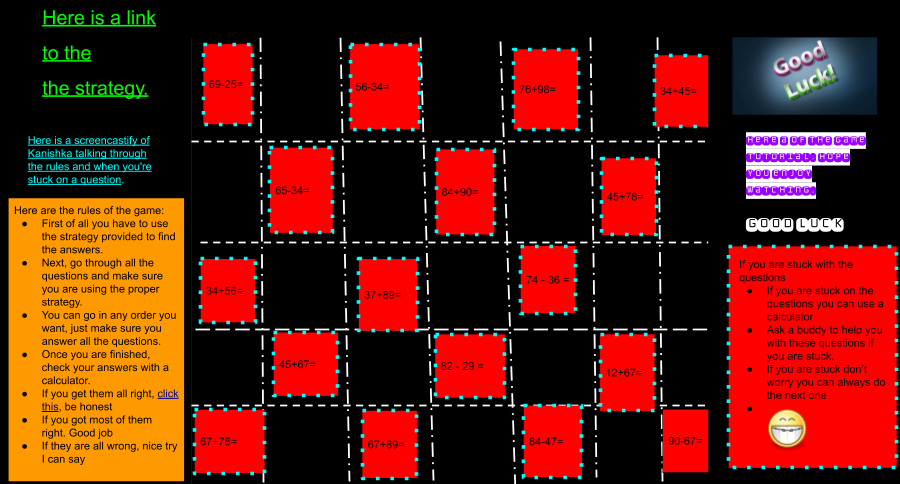
You can also check out Jay's presentation that he delivered to his class and hear the feedback he was given throughout on his game. This presentation has been shared on their class blog.
These are great examples of getting creative in math learning in designing high quality digital learning objects to share.
Credit - +Christina Fortes +Phil Margetts

Game on!
Gargee, Paris and Kanishka are Year 4 students in Setoga Class. They have used their digital skills to create a game using Google Drawing. You will see by checking out their game, they have also used their skills in Screencastify to explain the game and their strategy in a visual way.
You can also check out Jay's presentation that he delivered to his class and hear the feedback he was given throughout on his game. This presentation has been shared on their class blog.
These are great examples of getting creative in math learning in designing high quality digital learning objects to share.
Credit - +Christina Fortes +Phil Margetts
Let's go on Tour - Visible Teaching
In this blogpost, Karen Ferguson, a Design and Visual Communication teacher at Tamaki College, takes you on a tour of her class learning site. A great example to share with Secondary School teachers for inspiration and to build their understanding around the why, how and what of a Visible Teaching Site. This would also be useful for parents/whānau to develop their knowledge of utilising their child's class learning site as a window into their learning and assessments.

Getting Creative with Procedural Writing
Aidan is a Year 7 student at Paparoa Range School who has been creating videos for procedural writing. His WALT was to write a procedural text and then use screencastify to record and share. Check out Aidan's blog to read about the process he used for this, his reflections and his screencastify video. A great example of getting creative with procedural writing and producing a digital learning object to share on your blog.


Manaiakalani Online Secondary Connect
On Wednesday 23rd November we welcomed participants from Northland College, Hornby High, Greymouth High, Tamaki College and Papakura High to our first ever Manaiakalani Online Secondary Connect through Google Hangout. We were inspired by our 3 guest speakers. +Nicola Wells, +Jason Borland, +Rowena Clemence, three of our Spark-Manaiakalani Innovative Teachers (MIT) who shared their stories.
Nicola, a Biology teacher at Tamaki College focused her MIT inquiry on 'Improving student outcomes in a Year 13 University Entrance subject (Biology) through visible learning'. Nicola shared how the structure of her visible Google Site has changed over the last three years to become a highly multi-modal site to engage learners. Nicola has also shared her teaching practice in 2016, as part of the Manaiakalani Google Class on Air.
Jason, a PE teacher at Papakura High focused his MIT inquiry on 'Addressing the problem of NCEA underachievement in my senior classes.' Jason began his story by sharing his initial reluctance to utilise digital technologies as a PE teacher and his lack of confidence. When he realised the advantages digital technologies were able to provide for his students he began his journey into capturing learning to ensure rewindable, accessible learning for his students. He now utilises his Google Site as a 'One Stop Shop' for teaching and learning.
Rowena, a visual arts teacher at Hornby High focused her MIT inquiry on 'Assess, Critique, Extend - Learn, Create, Share Visual Arts Junior Curriculum Levels. Rowena shared her story of starting blogs with her junior visual arts students and the process of reflecting and sharing on their work. Rowena also identified her Site and Blog as a place for students to go for rewindable learning.
The Google Slides are shared below and from these you are able to access links to Nicola, Jason and Rowena's inquiry blogs and class sites. The recording of the Google Hangout is also shared below.
We finished our Hangout with sharing our Manaiakalani Outreach vision and engaging in collaborative thinking around how we can reach this vision. You can check out our ideas on the padlet below.

HUGE gratitude to our guest speakers for sharing their stories. We look forward to 2017 and connecting further with our secondary school teachers.
Nicola, a Biology teacher at Tamaki College focused her MIT inquiry on 'Improving student outcomes in a Year 13 University Entrance subject (Biology) through visible learning'. Nicola shared how the structure of her visible Google Site has changed over the last three years to become a highly multi-modal site to engage learners. Nicola has also shared her teaching practice in 2016, as part of the Manaiakalani Google Class on Air.
Jason, a PE teacher at Papakura High focused his MIT inquiry on 'Addressing the problem of NCEA underachievement in my senior classes.' Jason began his story by sharing his initial reluctance to utilise digital technologies as a PE teacher and his lack of confidence. When he realised the advantages digital technologies were able to provide for his students he began his journey into capturing learning to ensure rewindable, accessible learning for his students. He now utilises his Google Site as a 'One Stop Shop' for teaching and learning.
Rowena, a visual arts teacher at Hornby High focused her MIT inquiry on 'Assess, Critique, Extend - Learn, Create, Share Visual Arts Junior Curriculum Levels. Rowena shared her story of starting blogs with her junior visual arts students and the process of reflecting and sharing on their work. Rowena also identified her Site and Blog as a place for students to go for rewindable learning.
The Google Slides are shared below and from these you are able to access links to Nicola, Jason and Rowena's inquiry blogs and class sites. The recording of the Google Hangout is also shared below.
We finished our Hangout with sharing our Manaiakalani Outreach vision and engaging in collaborative thinking around how we can reach this vision. You can check out our ideas on the padlet below.

HUGE gratitude to our guest speakers for sharing their stories. We look forward to 2017 and connecting further with our secondary school teachers.

Multi Modal Sites
The Google Drawing below links to a variety of Multi Modal Sites created by innovative teachers within the Manaiakalani cluster of schools. These sites can be used to inspire teachers and/or can simply be used by teachers as a resource. The Current Events site, created by Manaiakalani Digital Teacher Academy teachers, is freely available for colleagues to use. Most pages have the HTML for the page attached at the bottom of the page.
We have offered this so that our colleagues would have a quick way of accessing our content and repurposing for their own teaching. Help yourself! If you would like to acknowledge using our material, send a Tweet to @clusternz or comment on our Manaiakalani Google+ Community.
'How to' post on your blog - Student Voice
Mele is a Year 6 student at Wesley Primary School, part of the Ako Hiko cluster, in Auckland. Mele has utilised Screencastify to create a step by step tutorial on how to post to your blog. In this example, Mele is embedding a Google Drawing onto her blog. Mele also shares her expertise on changing HTML to get the Google Drawing the right size on the blog. This would be a great example to share with learners/teachers new to blogging as well as those needing support with rewindable learning around the process of embedding Google Drawings.
Head over to Mele's blog to give her a positive, thoughtful, comment on her blogpost.
Head over to Mele's blog to give her a positive, thoughtful, comment on her blogpost.
Subscribe to:
Posts (Atom)